How to put your Strudel music on Creative Code Art
Strudel is a way to make music with code. You write short patterns of notes and sounds, and they play in a loop. Change a pattern and the music changes. This guide shows how to put a piece of music on your artist page.
Above is Night Bus, a Strudel piece on the site. Press play to hear it.
1. Start a new work
- Sign in and open My account → My works.
- Press New work. The editor opens with a small example.
- In Tool, choose Strudel (music).
2. Write or paste your music
Write it as in the Strudel REPL on the Strudel website. A few basics:
note("c3 e3 g3")plays these notes one after another.<c2 a1>picks a different note each time round..s("sawtooth")chooses the sound.stack(...)plays several patterns at the same time.
Here is a short piece you can try:
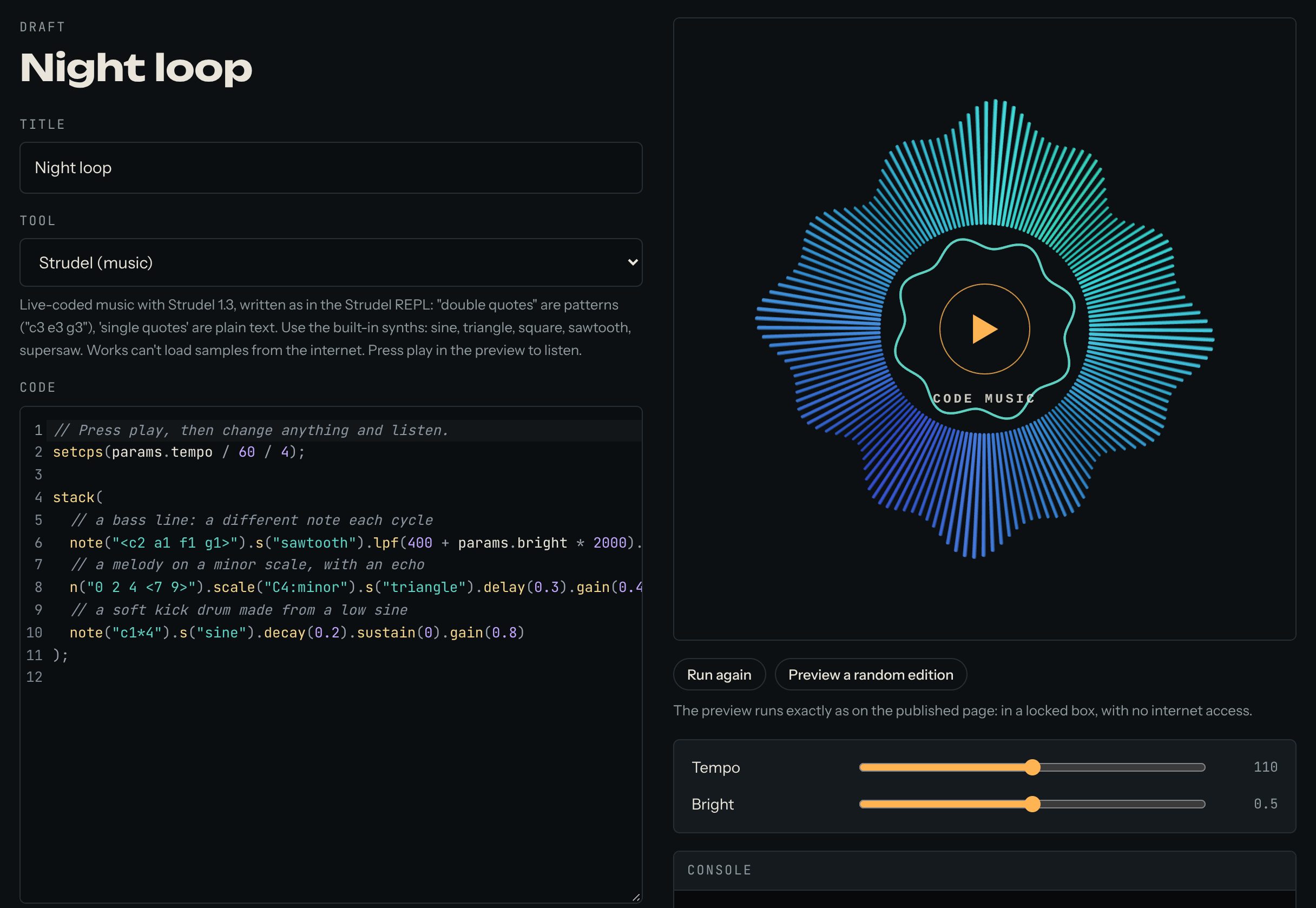
// Press play, then change anything and listen.
setcps(params.tempo / 60 / 4);

stack(
  // a bass line: a different note each cycle
  note("<c2 a1 f1 g1>").s("sawtooth").lpf(400 + params.bright * 2000).decay(0.3).sustain(0.2).gain(0.5),
  // a melody on a minor scale, with an echo
  n("0 2 4 <7 9>").scale("C4:minor").s("triangle").delay(0.3).gain(0.4),
  // a soft kick drum made from a low sine
  note("c1*4").s("sine").decay(0.2).sustain(0).gain(0.8)
);
Browsers only play sound after you press something, so press play in the preview to hear it.
3. Add sliders
A slider lets visitors change a number in your work while it runs, for example the speed. In your code, read the number as params. and a name, for example params.tempo. While the music plays, a new slider value is used from the next loop.
In the example above, params.tempo and params.bright become two sliders. When your code reads a name that has no slider yet, the editor says so and shows a button to add it. Then set each slider's lowest value (min), highest value (max) and starting value (start). For this example, try tempo from 60 to 160, starting at 112, and bright from 0 to 1, starting at 0.4.
4. Find mistakes with the console
Under the preview there's a Console. Whatever your code prints with console.log() shows there, and so do errors, in red. It's the quickest way to see what a value is.
5. Publish
Give the work a title, write a few lines in About this work, and press Publish. The site takes a picture of the work for its cover. The work now appears on your artist page and in Works.
Music works can't play until someone presses play, so their cover is their sound flower: a picture drawn from the work's own code.
Good to know
- Only Strudel's built-in sounds work:
sine,triangle,square,sawtoothandsupersaw. Works can't load sound samples from the internet. - Strudel is free software (AGPL-3.0), used unchanged.
Questions? Read "What is the flower on music works?" on the Help page, or ask in the Chat.