Remixes and licences
On Creative Code Art you can remix a work: make your own copy of it and change it as you like. The original artist is always credited, forever. This guide shows how remixing works, and which licence to choose for your own works.
Petal Storm is a p5.js work. If its artist allows it, you can remix it.
1. Remix a work
- Sign in. You need an artist page too.
- Open a work and press Remix under it.
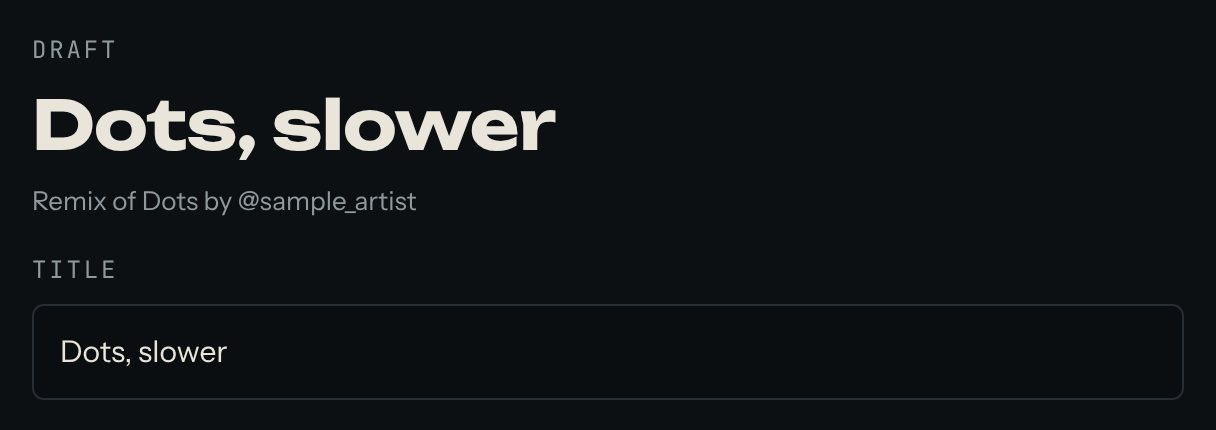
- A copy opens in your own editor. At the top it says which work it's a remix of.
- Change what you like, then press Publish.
The remix shows on your page, and its page always links back to the original. If you see Sign in to remix, sign in first. If there's no Remix button, the artist chose not to allow remixes.
2. The remix family
A work, its remixes and their remixes together are its remix family. Every work's page shows its family, so you can see how an idea grew.
3. Choose a licence for your work
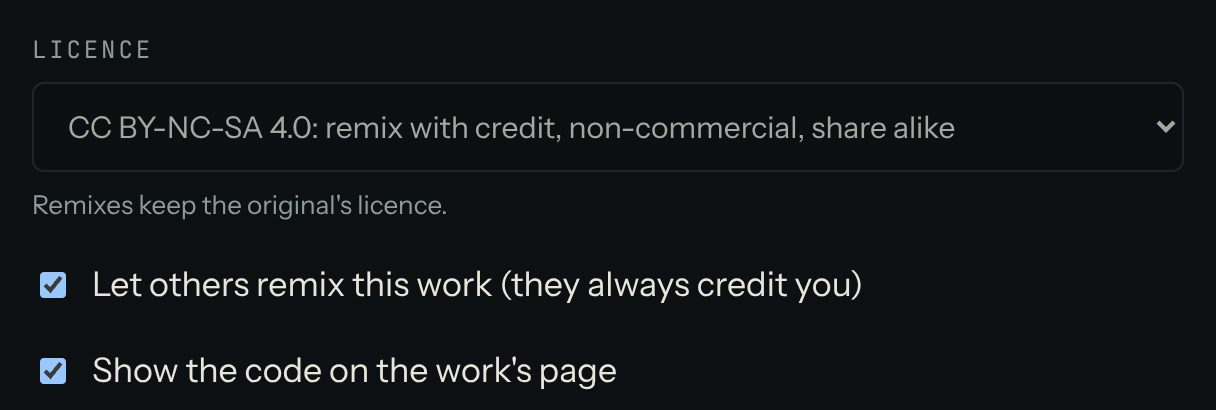
In the editor, Licence says how others may use your work:
- CC BY-NC-SA 4.0 (the default): others may remix it with credit, not for money, and share their remix the same way.
- CC BY-SA 4.0: remix with credit, and use for money is allowed. A remix shared further must keep the same licence.
- CC BY 4.0: remix with credit, and use for money is allowed.
- MIT: open-source code, for any use. The copyright and licence note must stay with the code.
- All rights reserved: people can view the work but not remix it.
On this site, a remix keeps the original's licence.
4. Other choices in the editor
- Let others remix this work (they always credit you): turn it off to hide the Remix button.
- Show the code on the work's page: turn it off to hide the View the code button. The code still has to reach the visitor's browser to run, so it isn't truly secret.
Questions? Read "Which licence should I choose?" on the Help page, or ask in the Chat.