How to pay with USDT, step by step
A few extras on Creative Code Art cost money: event tickets, code packs, supporting the site, and keeping an open call at the top of the board. You pay for them in USDT. If you've never used it, this guide walks you through it.
Making and sharing works like this one is free. Only a few extras are paid.
1. What USDT is
USDT (also called Tether) is a digital dollar: 1 USDT is worth about 1 US dollar. You keep it in a crypto app, such as Binance, OKX, Coinbase or Trust Wallet, and send it like a bank transfer.
To get some, open an account in one of those apps and buy USDT with your card or bank. Buy a little more than you need, because the app may charge a small fee to send it.
2. Pay, step by step
When you buy something, you land on a payment page. It shows:
- the exact amount to send, such as 25.137 USDT. The small extra at the end tells us which payment is yours.
- the network. We receive USDT only on TRON or BNB Smart Chain. In your app, choose the network shown on the payment page.
- the address to send to, with a QR code, and numbered steps.
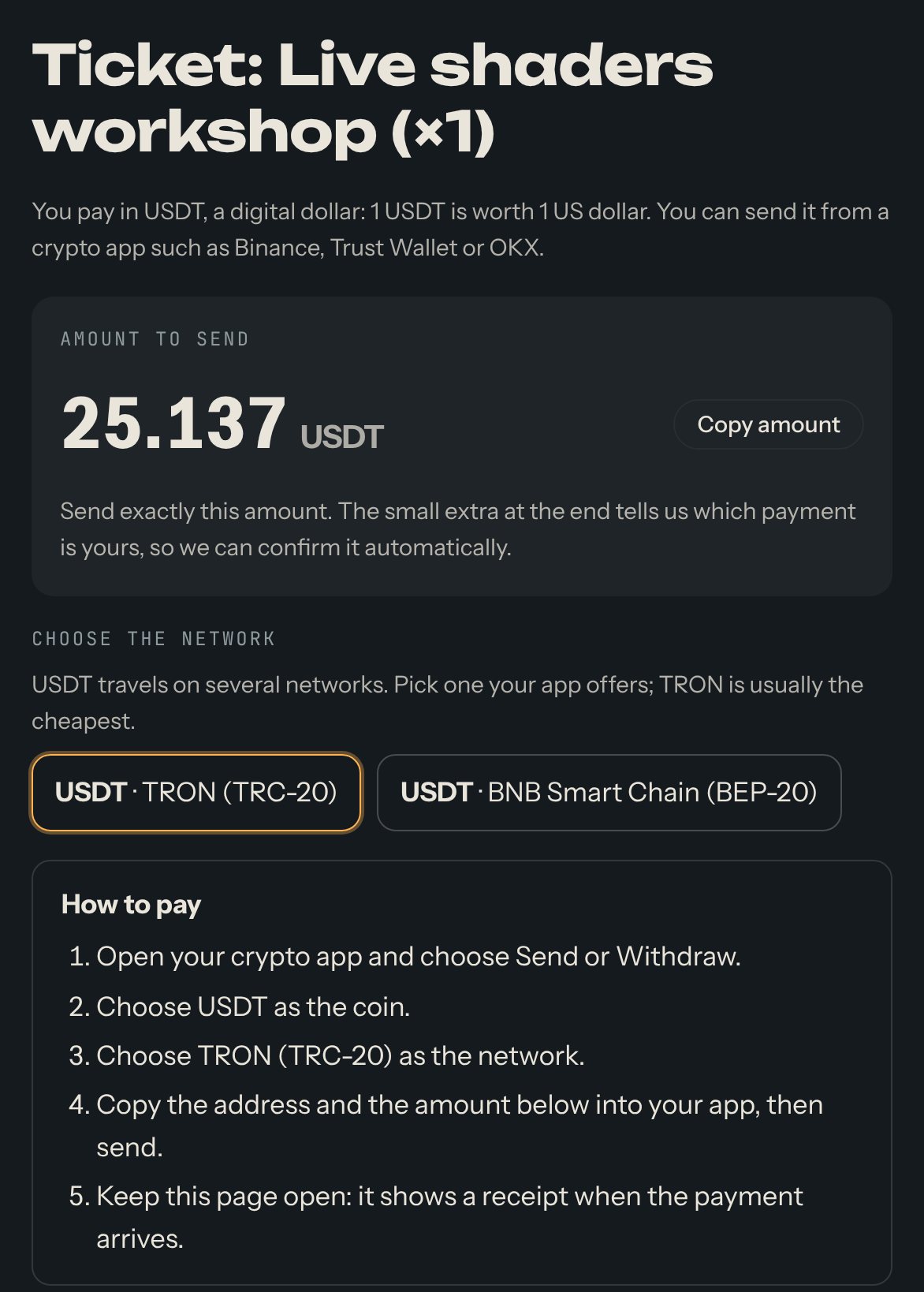
- In your app, choose Send or Withdraw.
- Choose USDT, then choose the network shown on the payment page, inside your app.
- Copy the address and the exact amount from the page into your app, and send.
- Keep the page open. Within about a minute it shows Payment received and a receipt you can print.
3. If something goes differently
- Your app took its fee out of the amount, so less arrived: paste your transaction ID (a long code in the details of the transfer) into the box on the page.
- The page says it can't find the payment: check you used the right network and address, and wait a minute.
- You sent the wrong amount, or need a refund: write to hello@creativecodeart.com with the link of your payment page.
Stay safe
- Send only USDT, and only on the network shown on the payment page. Another coin or network is lost.
- You never connect your wallet to this site. Nobody from us will ever ask for your password, recovery words (seed phrase) or private key.
Questions? See "How do I pay with a payment link?" and "What is USDT?" on the Help page.