How to show your shader on Creative Code Art
A shader is a small program that works out the colour of every pixel at once, on the graphics card. That's why shaders can draw rich, moving pictures very fast. This guide shows how to put a shader on your artist page.
Above is Chroma Scope, a shader on the site.
1. Start a new work
- Sign in and open My account → My works.
- Press New work. The editor opens with a small example.
- In Tool, choose GLSL shader.
2. Write or paste your shader
Write a fragment shader. The site gives it these values:
u_time: the time in seconds.u_resolution: the size of the picture in pixels.u_mouse: where the mouse is, in pixels.
Coming from Shadertoy? Paste your shader as it is: mainImage, iTime, iResolution and iMouse work too. Coming from TouchDesigner? Read the guide "How to show your TouchDesigner shader on Creative Code Art".
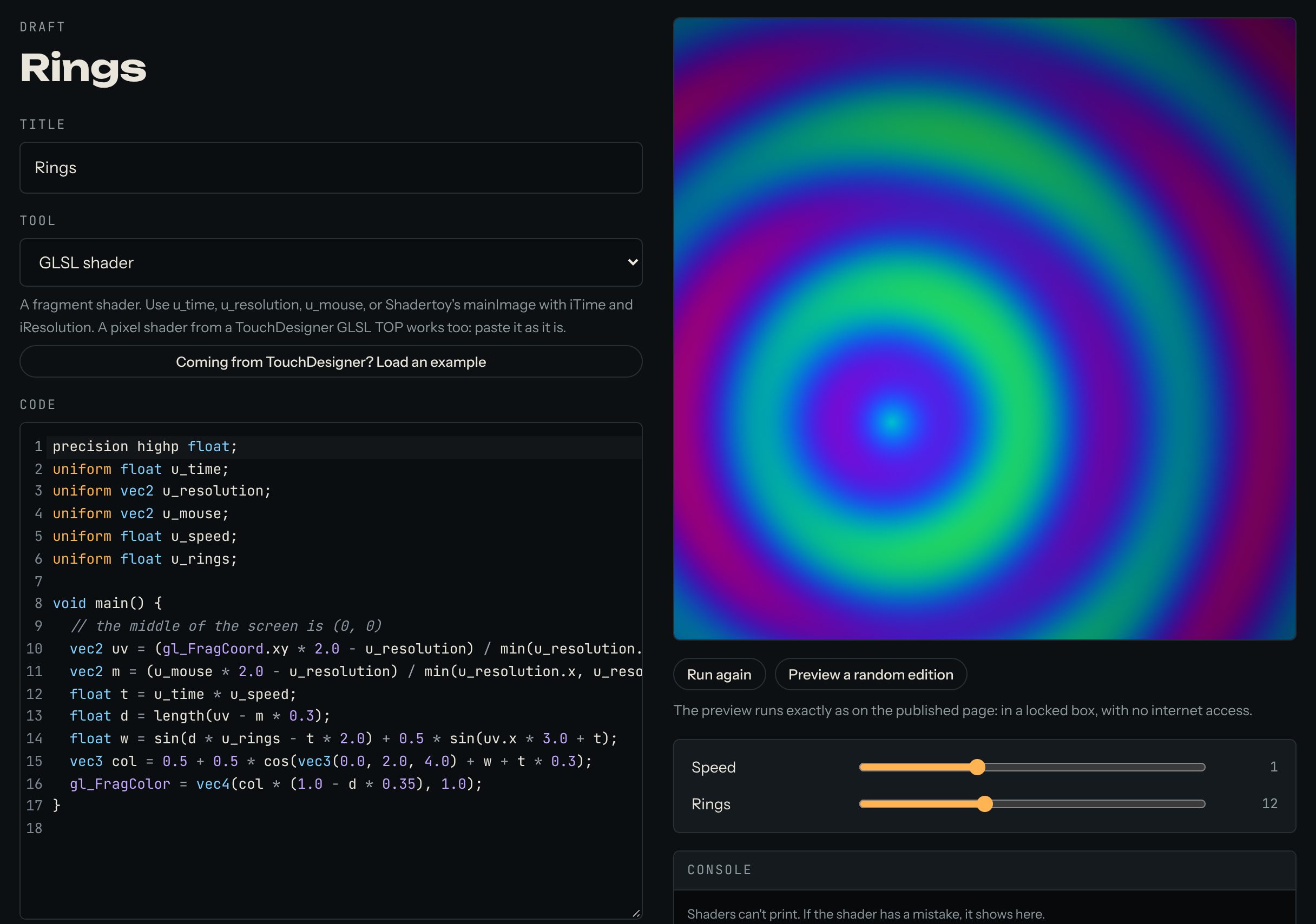
Here is a small shader you can try. The rings follow the mouse:
precision highp float;
uniform float u_time;
uniform vec2 u_resolution;
uniform vec2 u_mouse;
uniform float u_speed;
uniform float u_rings;

void main() {
  // the middle of the screen is (0, 0)
  vec2 uv = (gl_FragCoord.xy * 2.0 - u_resolution) / min(u_resolution.x, u_resolution.y);
  vec2 m = (u_mouse * 2.0 - u_resolution) / min(u_resolution.x, u_resolution.y);
  float t = u_time * u_speed;
  float d = length(uv - m * 0.3);
  float w = sin(d * u_rings - t * 2.0) + 0.5 * sin(uv.x * 3.0 + t);
  vec3 col = 0.5 + 0.5 * cos(vec3(0.0, 2.0, 4.0) + w + t * 0.3);
  gl_FragColor = vec4(col * (1.0 - d * 0.35), 1.0);
}
3. Add sliders
A slider lets visitors change a number in your work while it runs, for example the speed. In a shader, a slider called speed is the uniform u_speed. Declare it at the top: uniform float u_speed;.
In the example above, u_speed and u_rings become the sliders speed and rings. When your code reads a name that has no slider yet, the editor says so and shows a button to add it. Then set each slider's lowest value (min), highest value (max) and starting value (start). For this example, try speed from 0 to 3, starting at 1, and rings from 2 to 30, starting at 10.
4. Find mistakes
Shaders can't print values. If the shader has a mistake, the error and its line number show in the Console under the preview.
5. Publish
Give the work a title, write a few lines in About this work, and press Publish. The site takes a picture of the work for its cover. The work now appears on your artist page and in Works.
Good to know
- Shaders can't load pictures or videos, so everything is drawn by the code itself.
- For free editions,
u_seedis a different number for each edition (from 0 to 1), andu_editionis the edition's number.
Questions? Read "Which tools can I use?" on the Help page, or ask in the Chat.